
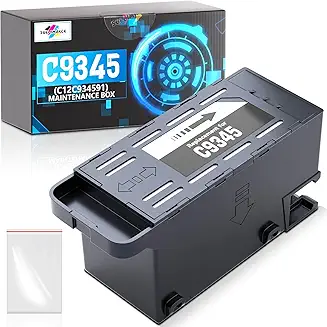
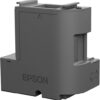
EPSON Maintenance Kit C12C934591 | Printer Waste Ink Maintenance Solution
Original price was: KSh 4,000.00.KSh 3,500.00Current price is: KSh 3,500.00. EXCL. VAT
EPSON Maintenance Kit C12C934591 | Printer Waste Ink Maintenance Solution
The EPSON Maintenance Kit C12C934591 is an essential component for sustaining performance and reliability in select Epson EcoTank and WorkForce Pro printers. By efficiently managing waste ink and supporting consistent print quality, this genuine Epson kit helps reduce downtime, extend printer life, and maintain dependable output — making it a valuable accessory for offices and professional environments.
EPSON Maintenance Kit C12C934591 | Printer Waste Ink Maintenance Solution
Product Overview
The EPSON Maintenance Kit C12C934591 is a genuine Epson service part designed to help maintain optimal printer performance by managing waste ink, reducing printing interruptions, and supporting long-term reliability. It is compatible with a range of Epson EcoTank and WorkForce Pro series printers including L6550, L6570, L6580, L11160, L15150, L15160, L15180, and M15180 models. Regular replacement helps prevent ink buildup inside your printer and supports consistent print quality.
This maintenance kit targets internal wear related to accumulated ink, capturing and storing excess ink that occurs during routine cleaning cycles and borderless printing. When the maintenance kit reaches capacity, your printer will prompt replacement to clear the message and resume printing smoothly.
Product Key Features
Genuine Epson OEM Part
Manufactured by Epson to match the exact specifications of supported models for dependable performance and compatibility.
Waste Ink Collection Function
Designed to safely collect and store excess ink generated during printhead cleaning and operations, reducing the risk of internal ink buildup.
Easy, Tool-Free Installation
Quick and straightforward replacement that typically does not require professional tools, helping minimize printer downtime.
Maintains Print Quality
By managing waste ink and maintaining clean internal components, this kit supports ongoing print quality and operational consistency.
Benefits
Extended Printer Longevity
Replacing worn or saturated maintenance components helps keep internal printer mechanisms functioning correctly, reducing the likelihood of breakdowns.
Reduced Service Interruptions
Clearing accumulated waste ink prevents common errors such as “maintenance kit full” alerts, helping ensure your printer stays productive.
Consistent Print Output
Proper maintenance supports clear printhead action and reduces issues like smudging or streaking, contributing to reliable output over time.
Cost-Effective Maintenance
Routine upkeep with this kit can help prevent costly repairs, making it a practical investment for busy offices and high-volume environments.
How to Use
-
Turn Off Printer: Before servicing, ensure your Epson printer is powered off and unplugged.
-
Access Maintenance Area: Follow your printer’s user manual instructions to access the maintenance compartment.
-
Replace Maintenance Kit: Remove the old maintenance kit and install the new C12C934591 unit securely in the designated slot.
-
Confirm Installation: Power the printer back on and verify that the maintenance kit indicator has reset.
-
Resume Printing: Continue printing with improved internal waste ink management.
Tip: Always use genuine Epson replacement kits, as third-party alternatives may not provide the same level of compatibility or protection. Genuine kits are designed to work seamlessly with your printer’s waste ink detection system.
Compliance Statement
The EPSON Maintenance Kit C12C934591 is a genuine Epson product manufactured under Epson’s quality, safety, and environmental standards. It is intended for use with the specified Epson printer models and complies with relevant manufacturing guidelines. Using this kit with supported printers helps preserve performance and ensures that internal mechanisms operate within designed parameters.
Product Technical Specifications
| Specification | Details |
|---|---|
| Model Number | C12C934591 |
| Product Name | EPSON Maintenance Kit |
| Compatible Printers | Epson L6550, L6570, L6580, L11160, L15150, L15160, L15180, M15180 |
| Kit Type | Printer Maintenance Kit / Waste Ink Collection |
| Installation | Tool-free / user-replaceable |
| Function | Collects and stores waste ink during cleaning cycles |
| Brand | Epson |
| Intended Use | Printer performance maintenance |
Be the first to review “EPSON Maintenance Kit C12C934591 | Printer Waste Ink Maintenance Solution”
Related products

Printers Accessories

Printers Accessories

Printers Accessories
Printers Accessories

Printers Accessories

Printers Accessories

Printers Accessories

Printers Accessories
Reviews
There are no reviews yet.