
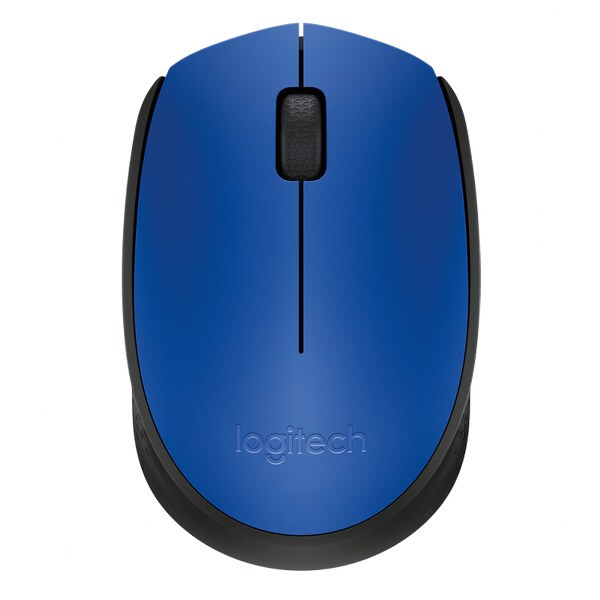
LOGITECH Wireless Mouse M171 – Blue | Reliable Ergonomic Mouse
Original price was: KSh 2,000.00.KSh 1,700.00Current price is: KSh 1,700.00. EXCL. VAT
LOGITECH Wireless Mouse M171 – Blue | Reliable Ergonomic Mouse
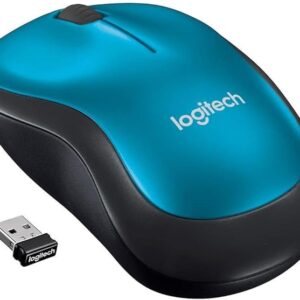
Get the LOGITECH Wireless Mouse M171 in blue — reliable, ergonomic, and plug-and-play wireless mouse for smooth everyday use on laptops and desktops.
| Specification | Details |
|---|
| Model Number | M171 |
| Brand | LOGITECH |
| Color | Blue |
| Connection | 2.4 GHz Wireless (USB Receiver) |
| Battery | 1 × AA (up to 12 months) |
| Compatibility | Windows, macOS, Linux, Chrome OS |
| Buttons | 3 (Left, Right, Scroll) |
| Dimensions | 99 mm × 60 mm × 39 mm |
| Weight | 70 g (including battery) |
| Package Includes | Mouse, USB receiver, AA battery |
LOGITECH Wireless Mouse M171 – Blue | Reliable Ergonomic Mouse
The LOGITECH Wireless Mouse M171 delivers consistent performance with a 2.4 GHz wireless connection that ensures stable, lag-free movement up to 10 meters away. Its plug-and-play simplicity eliminates setup delays — just plug the USB receiver into your laptop or desktop, and you’re ready to go.
The mouse is ideal for:
-
Home offices and professional workstations
-
Students and casual users needing smooth navigation
-
Laptops and desktops requiring wireless convenience
-
Anyone seeking a comfortable, reliable mouse for everyday tasks
Its lightweight, symmetrical design fits both left- and right-handed users, and the bright blue finish adds a touch of style to your workspace.
Product Key Features
Wireless Freedom
-
2.4 GHz wireless connection with up to 10 meters of range
-
Uninterrupted performance for browsing, editing, and productivity
Ergonomic Design
-
Contoured shape for comfortable long-term use
-
Suitable for left- and right-handed users
Long Battery Life
-
Up to 12 months of battery life with a single AA battery
-
Power-saving features reduce unnecessary energy use
Plug-and-Play Setup
-
USB nano receiver requires no software installation
-
Immediate operation on Windows, macOS, Linux, and Chrome OS
Compact & Portable
-
Lightweight and slim for easy portability
-
Fits perfectly in laptop bags or backpacks
Benefits
Comfortable & Reliable
The M171’s ergonomic design supports natural hand positioning, reducing strain during extended use. Its precise optical tracking ensures smooth cursor control on almost any surface.
Easy to Use Anywhere
With plug-and-play functionality and wireless freedom, you can work from your desk, sofa, or on the go without cable clutter.
Durable & Long-Lasting
Built with high-quality materials, this mouse is designed to last, while its long battery life keeps you productive without frequent replacements.
Stylish & Practical
The blue finish provides a vibrant, professional look, while the compact form factor keeps your workspace tidy and organized.
How to Use
-
Insert Battery: Open the battery compartment and insert one AA battery (included).
-
Connect USB Receiver: Plug the nano receiver into a USB port on your computer.
-
Turn On Mouse: Slide the power switch to “On.”
-
Start Using: Your mouse is ready for immediate use with no additional setup required.
Compliance Statement
The LOGITECH Wireless Mouse M171 complies with international safety and electromagnetic standards. Designed for ethical, everyday use, it avoids harmful emissions and meets environmental regulations for consumer electronics.
Product Technical Specifications
| Specification | Details |
|---|---|
| Model Number | M171 |
| Brand | LOGITECH |
| Color | Blue |
| Connection | 2.4 GHz Wireless (USB Receiver) |
| Battery | 1 × AA (up to 12 months) |
| Compatibility | Windows, macOS, Linux, Chrome OS |
| Buttons | 3 (Left, Right, Scroll) |
| Dimensions | 99 mm × 60 mm × 39 mm |
| Weight | 70 g (including battery) |
| Package Includes | Mouse, USB receiver, AA battery |
Conclusion
The LOGITECH Wireless Mouse M171 – Blue combines ergonomic comfort, reliable wireless performance, and long-lasting battery life in a stylish, portable design. Perfect for home, office, and on-the-go use, it’s an ideal choice for anyone seeking a dependable, hassle-free wireless mouse.
Be the first to review “LOGITECH Wireless Mouse M171 – Blue | Reliable Ergonomic Mouse”
Related products




Reviews
There are no reviews yet.