
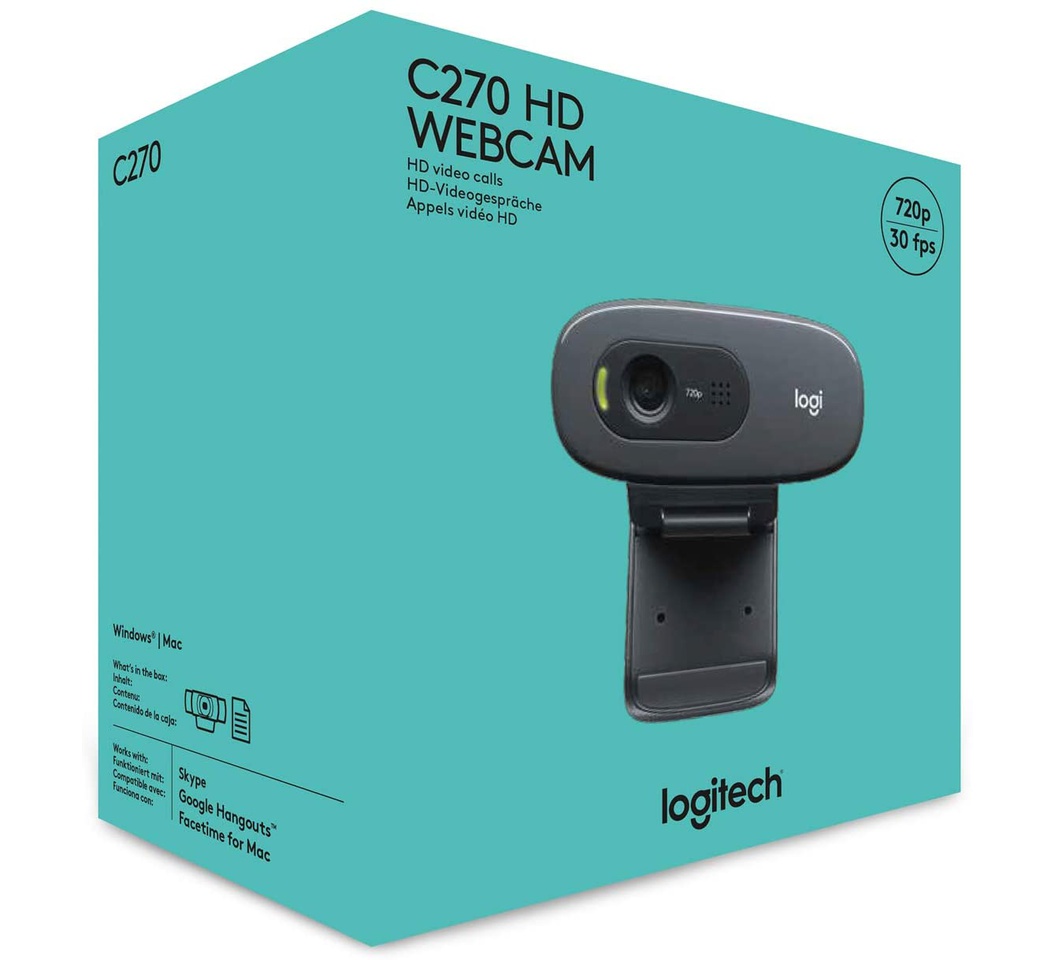
Logitech HD Webcam C270 – USB | High-Definition Video Camera
Original price was: KSh 5,000.00.KSh 4,000.00Current price is: KSh 4,000.00. EXCL. VAT
Logitech HD Webcam C270 – USB | High-Definition Video Camera
Buy the Logitech HD Webcam C270 – USB for clear, high-definition video calls and recordings. Plug-and-play webcam ideal for work, study, and streaming.
| Specification | Details |
|---|---|
| Model Number | C270 |
| Brand | Logitech® |
| Connection | USB 2.0 |
| Video Resolution | 720p HD (1280×720) |
| Frame Rate | Up to 30 fps |
| Field of View | 60° |
| Microphone | Built-in mono, noise-reducing |
| Compatibility | Windows, macOS, Linux |
| Dimensions | 69 mm × 27 mm × 44 mm |
| Weight | 95 g |
| Package Includes | Webcam C270, USB cable, Quick Start Guide |
Logitech HD Webcam C270 – USB | High-Definition Video Camera
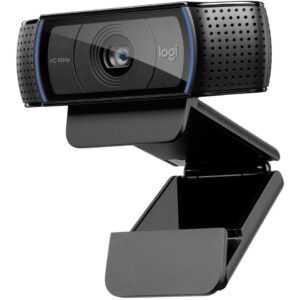
The Logitech HD Webcam C270 is designed to provide clear video for online meetings, virtual classes, and casual streaming. With its built-in microphone and HD resolution, it delivers reliable audio-visual quality that enhances communication and collaboration.
Ideal for:
-
Remote work and video conferencing
-
Online learning and virtual classrooms
-
Live streaming and content creation
-
General personal and professional video calls
Its compact design makes it easy to attach to laptops or monitors, while the USB connection ensures quick and easy setup.
Product Key Features
High-Definition Video
-
720p HD resolution for sharp, clear video
-
Automatic light correction enhances image quality in low-light environments
Built-In Microphone
-
Mono microphone with noise reduction for clearer voice capture
-
Eliminates the need for separate audio equipment
Plug-and-Play USB Connectivity
-
USB interface allows quick installation on Windows, macOS, and Linux
-
No software installation required for basic video calls
Compact and Adjustable
-
Clip-on design fits laptops, monitors, or desktops
-
Adjustable tilt to customize viewing angle
Durable and Lightweight
-
Sturdy build for long-term use
-
Lightweight and portable for on-the-go video needs
Benefits
Professional Video Quality
Look your best during video calls, presentations, or virtual meetings with crisp HD video and vibrant color reproduction.
Clear Audio Communication
The built-in microphone captures clear sound while minimizing background noise, making conversations more effective.
Easy to Use
With plug-and-play USB connectivity, setup is simple and fast — ideal for users of all skill levels.
Portable and Versatile
Its compact size and adjustable clip allow use with laptops, desktops, or external monitors, perfect for home or office environments.
Cost-Effective Solution
Offers professional HD video without the expense of high-end cameras, making it ideal for remote work, study, and casual streaming.
How to Use
-
Connect Webcam: Plug the USB cable into an available USB port on your computer.
-
Position Webcam: Attach the webcam to your laptop or monitor using the adjustable clip.
-
Open Video App: Launch your preferred video conferencing or recording application.
-
Adjust Angle: Tilt the webcam to frame yourself properly.
-
Start Video Call or Recording: Begin your meeting, class, or streaming session.
Compliance Statement
The Logitech HD Webcam C270 complies with international safety, electromagnetic, and environmental standards. It is designed for ethical, lawful use in personal and professional settings and meets Logitech’s strict quality and safety regulations.
Product Technical Specifications
| Specification | Details |
|---|---|
| Model Number | C270 |
| Brand | Logitech® |
| Connection | USB 2.0 |
| Video Resolution | 720p HD (1280×720) |
| Frame Rate | Up to 30 fps |
| Field of View | 60° |
| Microphone | Built-in mono, noise-reducing |
| Compatibility | Windows, macOS, Linux |
| Dimensions | 69 mm × 27 mm × 44 mm |
| Weight | 95 g |
| Package Includes | Webcam C270, USB cable, Quick Start Guide |
Conclusion
The Logitech HD Webcam C270 – USB is a reliable, high-quality solution for video calls, online learning, and casual streaming. Its HD video, built-in microphone, and plug-and-play setup make it an ideal choice for home, office, or remote work, ensuring clear communication and professional results every time.
Be the first to review “Logitech HD Webcam C270 – USB | High-Definition Video Camera”
Related products
Reviews
There are no reviews yet.