

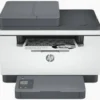
HP LaserJet MFP M236sdn Printer – Print, Copy & Scan with Duplex and ADF (9YG08A)
Original price was: KSh 40,000.00.KSh 37,000.00Current price is: KSh 37,000.00. EXCL. VAT
HP LaserJet MFP M236sdn Printer – Print, Copy & Scan with Duplex and ADF (9YG08A)
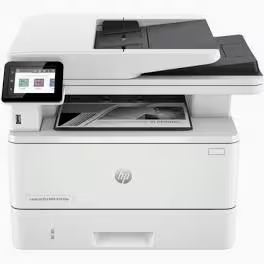
The HP LaserJet MFP M236sdn Printer is a dependable all-in-one solution for offices that require efficient printing, copying, and scanning in a single device. With duplex printing, an ADF, and flexible wired connectivity, it delivers consistent performance while supporting organized, productive workflows.
HP LaserJet MFP M236sdn Printer – Print, Copy & Scan with Duplex and ADF (9YG08A)
Introduction
The HP LaserJet MFP M236sdn Printer is built for small offices and workgroups that need dependable multifunction performance in a compact, professional design. It delivers fast monochrome printing, clear copying, and accurate scanning while supporting efficient document handling and secure wired connectivity.
Product Overview
The HP LaserJet MFP M236sdn Printer is a multifunction laser printer designed to simplify everyday office tasks. It combines printing, copying, and scanning in one reliable device, making it ideal for administrative work, customer documentation, reporting, and record management.
Equipped with automatic duplex printing, this printer helps reduce paper usage while maintaining productivity. The built-in Automatic Document Feeder (ADF) allows users to process multi-page documents efficiently, saving time on copying and scanning tasks.
With both Ethernet and USB connectivity, the M236sdn integrates easily into shared office environments or individual workstations. HP’s proven LaserJet technology ensures consistent text quality and dependable performance for daily workloads.
Product Key Features
Multifunction Capability
-
Print, copy, and scan from a single device
-
Designed for everyday business document handling
Automatic Duplex Printing
-
Print on both sides of the page automatically
-
Helps reduce paper consumption
Automatic Document Feeder (ADF)
-
Handles multi-page scanning and copying
-
Improves workflow efficiency
Wired Connectivity Options
-
Ethernet for shared office use
-
USB for direct, secure connection
Compact Office-Ready Design
-
Fits comfortably in small and medium workspaces
-
Durable construction for consistent use
Benefits
-
Improved Productivity: Handles multiple document tasks without switching devices
-
Paper Efficiency: Duplex printing supports cost-effective operations
-
Time Savings: ADF streamlines copying and scanning of multi-page documents
-
Professional Output: Produces sharp, readable text for business use
-
Flexible Setup: Suitable for both shared networks and individual desks
How to Use
-
Position the HP LaserJet MFP M236sdn Printer on a stable surface in your workspace.
-
Connect the printer using Ethernet for network use or USB for direct connection.
-
Install the required drivers on your computer.
-
Load paper into the input tray and documents into the ADF if needed.
-
Print, copy, or scan documents directly from the control panel or connected computer.
Compliance Statement
The HP LaserJet MFP M236sdn Printer is designed for lawful, ethical office and personal document processing. It complies with applicable safety and operational standards and supports responsible use in professional environments without enabling unauthorized activities.
Product Technical Specifications
General
-
Brand: HP
-
Model: LaserJet MFP M236sdn
-
Product Number: 9YG08A
Functions
-
Print
-
Copy
-
Scan
Printing
-
Type: Monochrome laser
-
Duplex: Automatic
Document Handling
-
Automatic Document Feeder (ADF): Yes
Connectivity
-
Interfaces: Ethernet, USB
Design
-
Compact multifunction desktop printer
-
Built for small offices and workgroups
Be the first to review “HP LaserJet MFP M236sdn Printer – Print, Copy & Scan with Duplex and ADF (9YG08A)”
Related products


Reviews
There are no reviews yet.