
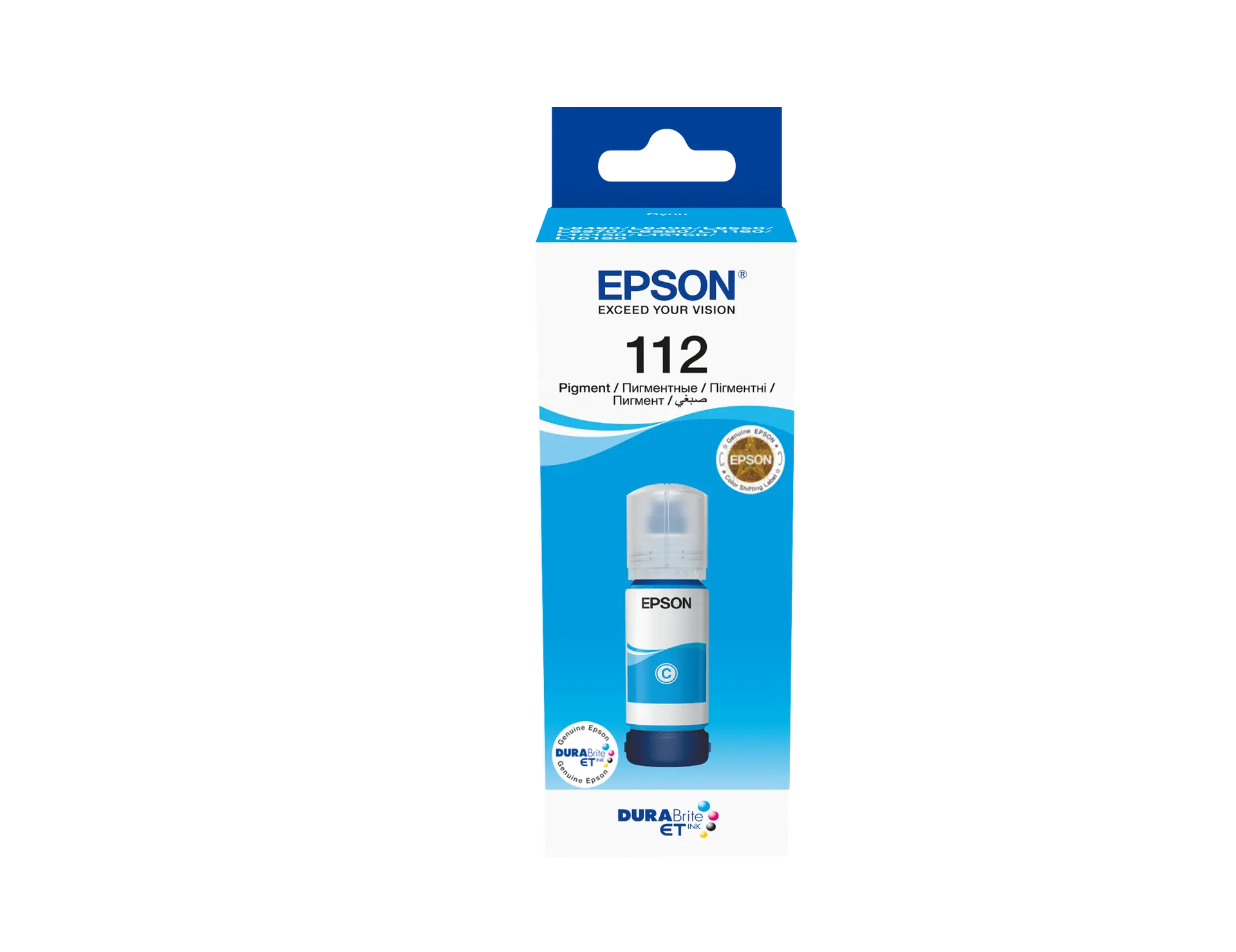
Epson 112 EcoTank Pigment Cyan Ink Bottle 70ml – Epson 112 Ink for Accurate Color Printing
KSh 2,800.00 EXCL. VAT
Epson 112 EcoTank Pigment Cyan Ink Bottle 70ml – Epson 112 Ink for Accurate Color Printing
Epson 112 EcoTank Pigment Cyan Ink Bottle 70ml is designed to deliver precise cyan color output for compatible EcoTank printers. As part of the Epson 112 ink series, it uses pigment-based ink technology to support sharp color detail, improved durability, and consistent print performance across a range of everyday printing tasks.
Epson 112 EcoTank Pigment Cyan Ink Bottle 70ml – Epson 112 Ink for Accurate Color Printing
The Epson 112 EcoTank Pigment Cyan Ink Bottle 70ml is intended for users who require dependable color reproduction in documents, graphics, and presentations. It works with Epson EcoTank printers that support the Epson 112 ink series, ensuring smooth integration and reliable output.
This ink bottle is suitable for home, office, and educational environments where consistent color accuracy and clarity are important. Its pigment-based formulation contributes to well-defined prints that maintain quality over time.
Product Key Features
Pigment-Based Cyan Ink for Clear Output
The Epson 112 EcoTank Pigment Cyan Ink Bottle 70ml produces crisp cyan tones that enhance the quality of color prints and visuals.
Reliable Color Consistency
Formulated to maintain uniform color output, helping ensure balanced results across multiple pages and print jobs.
Optimized Ink Capacity
With a 70ml volume, this ink bottle supports regular printing needs while reducing the frequency of refills.
Clean and Controlled Refilling
The bottle design allows for smooth ink transfer into the tank, helping minimize spills and simplify the refilling process.
Compatible with EcoTank Printers
Specifically designed for Epson EcoTank printers that support Epson 112 ink, ensuring proper compatibility and stable performance.
Benefits
- Produces accurate cyan tones for high-quality color prints
- Supports consistent results for documents, graphics, and presentations
- Reduces interruptions with efficient ink usage
- Easy refill process suitable for everyday users
- Helps maintain stable printer performance when used with compatible devices
- Ideal for moderate to regular printing environments
How to Use
- Power on the printer and open the ink tank compartment.
- Locate the cyan ink tank and open its cap.
- Remove the cap from the Epson 112 EcoTank Pigment Cyan Ink Bottle 70ml.
- Align the nozzle with the ink tank opening.
- Allow the ink to flow gently into the tank without squeezing excessively.
- Stop when the ink reaches the recommended level.
- Close the tank securely and replace the bottle cap after use.
Compliance Statement
The Epson 112 EcoTank Pigment Cyan Ink Bottle 70ml is intended for legitimate printing purposes and should be used only with compatible Epson EcoTank printers as specified by the manufacturer. Following proper handling and usage instructions helps ensure safe operation and consistent print quality.
Product Technical Specifications
- Product Name: Epson 112 EcoTank Pigment Cyan Ink Bottle 70.0 ml
- Model Number: Epson 112
- Focus Keyword: Epson 112 EcoTank Pigment Cyan Ink Bottle 70ml
- Color: Cyan
- Ink Type: Pigment-based ink
- Ink Volume: 70.0 ml
- Compatibility: Epson EcoTank printers supporting Epson 112 ink series
- Usage: Home, office, and educational printing
- Refill System: Spill-resistant controlled ink flow bottle
- Application: Documents, graphics, presentations, and color printing
Conclusion
The Epson 112 EcoTank Pigment Cyan Ink Bottle 70ml provides a reliable solution for users seeking consistent cyan color output and dependable print performance. As part of the Epson 112 ink series, it supports efficient printing while maintaining clarity, durability, and ease of use for everyday printing needs.
Be the first to review “Epson 112 EcoTank Pigment Cyan Ink Bottle 70ml – Epson 112 Ink for Accurate Color Printing”
Related products
Printers Accessories
Epson 103 Cyan Ink Cartridge 65ml (C13T00S24A) – Genuine EcoTank Ink
Printers Accessories
Epson 108 Magenta Ink Cartridge 70ml (C13T09C34A) – Genuine EcoTank Photo Ink
Printers Accessories
Epson 101 Magenta Ink Cartridge 70ml (C13T03V34A) – Genuine EcoTank Ink
Reviews
There are no reviews yet.