
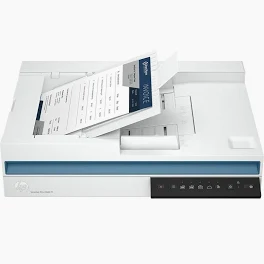
HP ScanJet Pro 2600 f1 Scanner – ADF, Duplex ADF Scanning, USB Interface (20G05A)
KSh 35,000.00 EXCL. VAT
HP ScanJet Pro 2600 f1 Scanner – ADF, Duplex ADF Scanning, USB Interface (20G05A)
HP ScanJet Pro 2600 f1 Scanner delivers fast, reliable scanning with automatic document feeder and duplex ADF scanning over USB — ideal for offices and professional workflows.The HP ScanJet Pro 2600 f1 Scanner brings reliable, high-speed scanning to the desktop. Featuring automatic document feeding, duplex scanning, and a simple USB interface, it’s well-suited for office teams and professional users who need to turn stacks of paper into searchable digital files quickly and accurately. It’s a smart choice for efficient document management and everyday scanning tasks.
HP ScanJet Pro 2600 f1 Scanner – ADF, Duplex ADF Scanning, USB Interface (20G05A)
Introduction
The HP ScanJet Pro 2600 f1 Scanner is a dependable document scanning solution designed for busy offices and professional users who require fast, accurate capture of single- and double-sided documents. With a robust automatic document feeder (ADF) and built-in duplex scanning, it streamlines workflows and boosts efficiency.
Product Overview
The HP ScanJet Pro 2600 f1 Scanner (20G05A) combines simplicity, speed, and reliability in a compact footprint. Whether you’re converting paper documents to digital archives, managing records, or processing multi-page files, this scanner simplifies repetitive tasks.
Featuring a USB interface for straightforward plug-and-play setup, the ScanJet Pro 2600 f1 integrates seamlessly with PCs and workstations. Its automatic document feeder and duplex ADF scanning capability eliminate the need to manually flip pages — saving time and minimizing user effort.
Product Key Features
Fast Automatic Document Feeder (ADF)
-
Efficiently processes stacks of documents
-
Reduces manual handling for higher productivity
Duplex ADF Scanning
-
Captures both sides of the page in one pass
-
Ideal for contracts, reports, invoices, and archival projects
USB Connectivity
-
Simple USB interface for reliable connection
-
Plug-and-go scanning with supported applications
Compact Office-Ready Design
-
Sleek, space-efficient build for desktops and cubicles
-
Professional quality built for frequent use
High-Quality Scanning
-
Sharp, detailed document capture
-
Suitable for both text and mixed-media items
Benefits
-
Time-Saving: Duplex ADF removes the need to manually flip pages
-
Enhanced Workflow: Scans high volumes with consistent performance
-
Reliable Performance: Engineered for everyday office scanning needs
-
Easy Connection: USB setup eliminates network complexity
-
Digital Transformation: Quickly converts paper archives into digital files
How to Use
-
Place the HP ScanJet Pro 2600 f1 Scanner on a stable surface near your workstation.
-
Connect the scanner to your computer using a USB cable.
-
Install the recommended HP scanning drivers and software.
-
Load documents into the ADF tray (ensure pages are aligned).
-
Use your scanning software to select single- or double-sided scanning and begin the job.
Compliance Statement
The HP ScanJet Pro 2600 f1 Scanner is designed for lawful business, office, and personal document processing. It complies with applicable hardware safety and performance standards and supports ethical use for digital conversion and record-keeping.
Product Technical Specifications
General
-
Brand: HP
-
Model: ScanJet Pro 2600 f1
-
Product Number: 20G05A
Document Handling
-
ADF: Yes
-
Duplex ADF Scanning: Yes
Connectivity
-
Interface: USB
Design
-
Compact, desktop scanner
-
Built for frequent professional use
Usage
-
Ideal for offices, administrative teams, and document-heavy environments
Be the first to review “HP ScanJet Pro 2600 f1 Scanner – ADF, Duplex ADF Scanning, USB Interface (20G05A)”
Related products
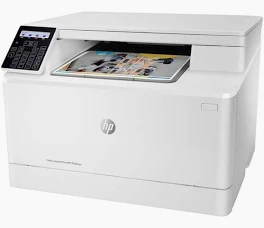
Printers
HP LaserJet Pro MFP 4103fdw Printer – Wireless Duplex Print, Scan & Fax with Touchscreen (2Z629A)

Reviews
There are no reviews yet.